Business Decks

Synchronous Training
New Manager Onboarding

Audience: Professional Onboarding and Training
Business Type: Mid-size corporate

This video provides a visual walkthrough in presentation mode, showcasing all triggers, layers, and animations. Please note that there is no audio or voiceover included.
To view flat and static deck iteration, click here.
Context
The asset, "Synchronous Training: New Manager Onboarding," is a comprehensive training deck designed to equip new managers with essential skills and knowledge. It serves as the first part of a three-part, 15-week development series aimed at new managers.

The goal is to prepare them to lead effectively by focusing on key areas such as KPIs, compliance, and workplace culture. This synchronous, workshop-style training is designed to complement pre-completed self-assessments and is intended to be delivered in a classroom or virtual setting.

  • All graphics, deck elements, transitions, animations, triggers, and infographics were custom designed and built within PowerPoint for this presentation.

  • Celebrating wins and peer engagement

    • Gift 1

    • FISH! An ongoing acknowledgement and engagement activity used to support healthy work cultures and effective team building

    Job Aid

    In-Training Learner Engagement

    • Unconscious Bias Case Study

    • Role-Play conflict resolution with partner practice.

    • Reaction Engagement

    • Quick guesses and live-polling

    Room Whiteboard

    • Highlight key dates and call-outs (correlates to key objectives)

    • Mind-mapping and group think

    Manager playbook

    • Guidebook used for reference in and outside of class. Instructor to call out correlating and key references during training.

  • The training aims to help new managers:

    • Understand and apply KPIs effectively.

    • Ensure team compliance with regulations and policies.

    • Develop self-awareness and mitigate unconscious biases.

    • Promote a safe and inclusive workplace.

    • Master conflict resolution strategies.

  • The asset is designed for Instructor-Led Training (ILT), either in-person or virtual. It includes extended group activities to foster discussion and interaction, as well as multiple engagement tools like QR scans, knowledge checks, and live polling. These strategies are intended to keep participants actively involved and reinforce learning objectives.

  • Sample SMART goals for the attending managers based on the cohort training:

    • Compliance: Increase team compliance with applicable regulations, policies, and procedures by X% by the end of the next quarter.

    • Self-awareness: Identify at least X unconscious biases and take corrective action within the next [X-timeframe].

    • Safe workplace: Reduce the number of reported workplace safety incidents and near-misses by X% by the end of the next quarter.

    • Anti-discrimination: Implement or integrate at least [#] of initiatives to promote a more diverse and inclusive team culture within the next two months.

    • Conflict resolution: Successfully resolve X% of workplace conflicts within the manager's team without escalation to upper management.

    • KPIs: Increase team's performance goals by X% as measured by KPIs, such as sales growth or business satisfaction scores by the end of the next quarter.

    • Training effectiveness: Facilitate at least [#] of peer coaching sessions with mentor to share and reinforce skills and knowledge gained from the training within the next month.

    • Manager feedback: Achieve a X% positive rating from team members on promoting a positive work culture and managing conflicts in the next employee engagement survey.

    Sample KPIs for the attending managers based on the cohort training:

    • Compliance: Percentage of team members who comply with all applicable regulations, policies, and procedures.

    • Self-awareness: Number of instances where the manager identified their own unconscious biases and took corrective action.

    • Safe workplace: Number of reported workplace safety incidents and near-misses.

    • Anti-discrimination: Number of reported incidents of discrimination or harassment within the manager's team.

    • Conflict resolution: Number of workplace conflicts resolved without escalation to upper management.

    • KPIs: Achievement of team's performance goals as measured by KPIs, such as sales growth or customer satisfaction scores.

    • Training effectiveness: Percentage of participants who report the training was helpful in developing their skills and knowledge as managers.

    • Manager feedback: Percentage of team members who report their manager is effective in promoting a positive work culture and managing conflicts.

  • The asset includes a multi-level evaluation strategy:

    • Level 1 (Reaction): Post-training surveys to gauge immediate participant feedback.

    • Level 2 (Learning): Pre- and post-training scenarios to assess knowledge retention.

    • Level 3 (Behavior): Manager and peer feedback to measure the application of learned skills.

    • Level 4 (Results): Review of performance metrics, such as compliance rates and KPIs, to evaluate the long-term impact of the training.

Business Deck
(Investor Pitch and Discovery Deck)

This deck is interactive. Double-click showcased assets to play videos and interact with the graphics.

Product: Traveler Trainer PROgram, eLearning
Product end-users: University Students

Context
The primary purpose of this deck is to raise business capital by showcasing the financial value and market potential of the Traveler Trainer PROgram. By shifting the focus from academic research to business growth and scalability, the deck aims to attract investors who can help the company expand its market reach and secure a solid foothold in the pre-departure global education industry (university students, ages 18-22).

  • The primary audience for this asset includes potential investors and business professionals focused on capital growth and market opportunities.

    Previously, the business did not have collateral targeting non-academic (collegiate educators) audiences, requiring a mindset shift for the owner, a career academic and collegiate educator.

    The success and growth of the business's flagship product, the Traveler Trainer PROgram, require investment from outside academia. This deck is essential for pitching and introducing the product to potential investors, demonstrating its market viability beyond academia.

  • Per the business request, the deck was created in Canva for its ease of use and integration capabilities with Genial.ly, which enabled embedded animation and interactivity.

    All showcased assets in this deck were created by Antonetta using eLearning tech for related module development.

  • The main challenge was transitioning the focus from career educators and academia to a business-oriented audience, necessitating a shift in messaging to emphasize financial viability, disclosure, market opportunity, and scalability.

    The deck had to present the business value in a clear, concise manner that would resonate with investors rather than educators.

    Additionally, the limitations of Canva in terms of transitions and custom animations made it critical to balance the content density and visual appeal. The content was strategically chunked into manageable sections, utilizing visuals to maintain audience interest and clarity.

    The final deck led the business to prioritize visual storytelling, limit the key points per slide, and facilitate strategic, guiding discussions.

PowerPoint Infographic Samples

This is an interactive deck. Select a category to view samples
Desktop: Use your mouse to click between slides.
Mobile: Use the bottom navigation bar to navigate.

Wells Fargo Community Presentation Sample

Note: The majority of the work I did for Wells Fargo is not publicly available due to the confidential and proprietary nature. Source: This presentation can be found in the NCSL archives, National Conference of State Legislators, 2019. nscl.org

Client: Wells Fargo and NCSL
Audience: National Community Programs and Outreach
Business Type: Fortune 50 Finance

Context
The goal of this project was to inform and educate the audience about verified resource channels and the importance of using authentic communication during disasters. This involved creating a visual presentation that could effectively disseminate crucial information in a concise manner.

  • PowerPoint, Snagit, Photoshop

  • 4 hours; 5 iterations

  • Project Scope

    Outlined through one 30-minute call with presenter, a Senior Vice President. Information provided during discovery:

    • First iteration requested within 2 hours

    • provided 10 bulleted talking points outlining presentation

    • Employee pictures provided were unedited and of varying quality

    • Reference to documents that were to be highlighted in deck

    • Brand standard presentation (flat and static)

    Challenges:
    The project faced several challenges, including:

    • A complete build was required without a pre-existing storyboard or drafted vision.

    • Limited existing assets, with only the corporate logo, color palette, and design standards available.

    • As a public-facing asset, the presentation required additional vetting and internal sign-off.

    Solution:
    To address these challenges, I developed a visual-based deck that effectively utilized existing assets and created custom infographics. Key steps included:

    1. Infographic Development:

      • Slide 2 featured a travel-themed infographic that illustrated a four-step process aligned with the disaster mobile response bus.

    2. Visual Clarity:

      • Slide 3 displayed large, simplified graphics of verified communication samples (e.g., ATM messaging, mobile alerts, customer emails) to enhance understanding and provide concrete examples.

    3. Focused Messaging:

      • Slide 4 highlighted financial preparedness during disasters, utilizing existing customer-facing web copy to direct the audience to verified corporate channels.

    4. Enhanced Visuals for Emails:

      • Slides 5-6 showcased department-specific emails and educational materials, incorporating Snagit for visual reference and utilizing previously designed templates.

    5. Photo Refinement:

      • Slides 3 and 7-8 included edited employee photos, ensuring consistency in quality across the presentation.

    By transforming the content into engaging visuals and clear messaging, the final presentation effectively met the project's objectives and enhanced the audience's understanding of critical resource channels.

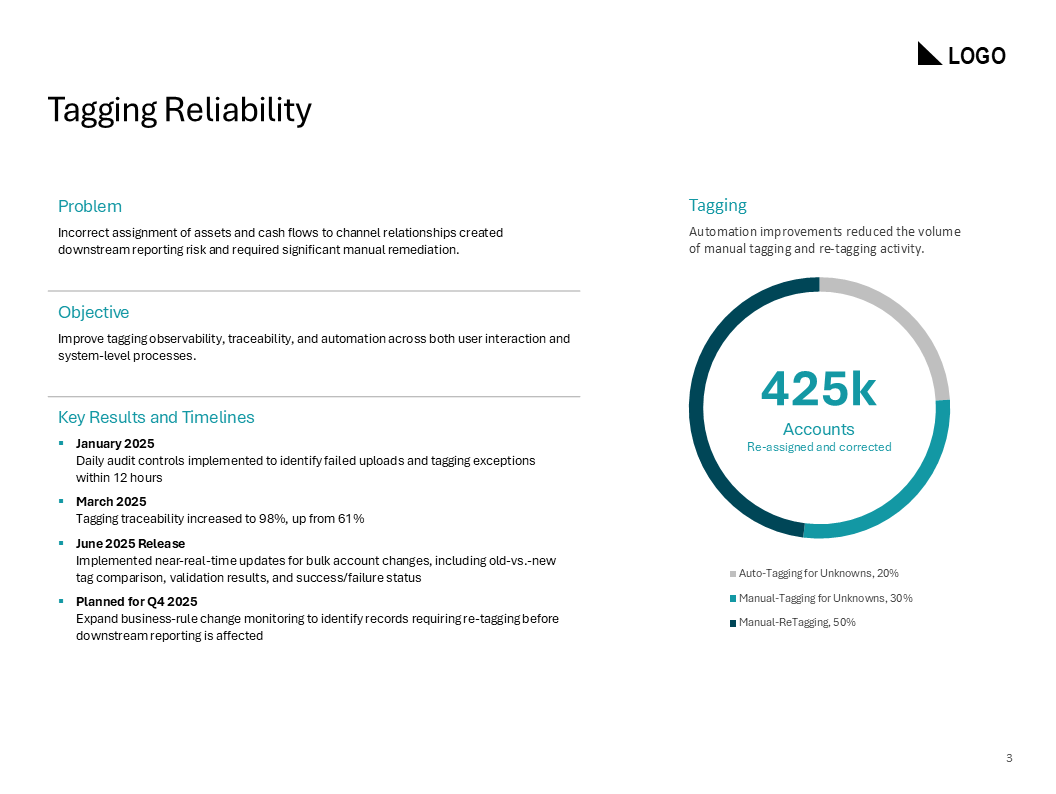
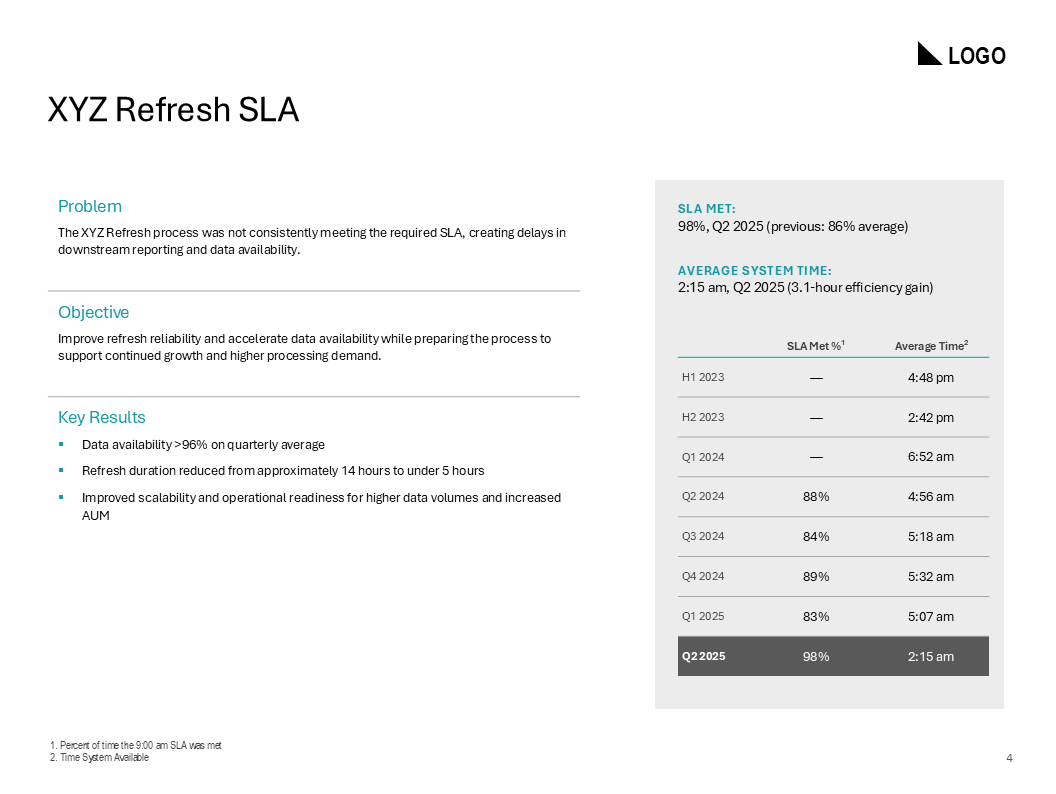
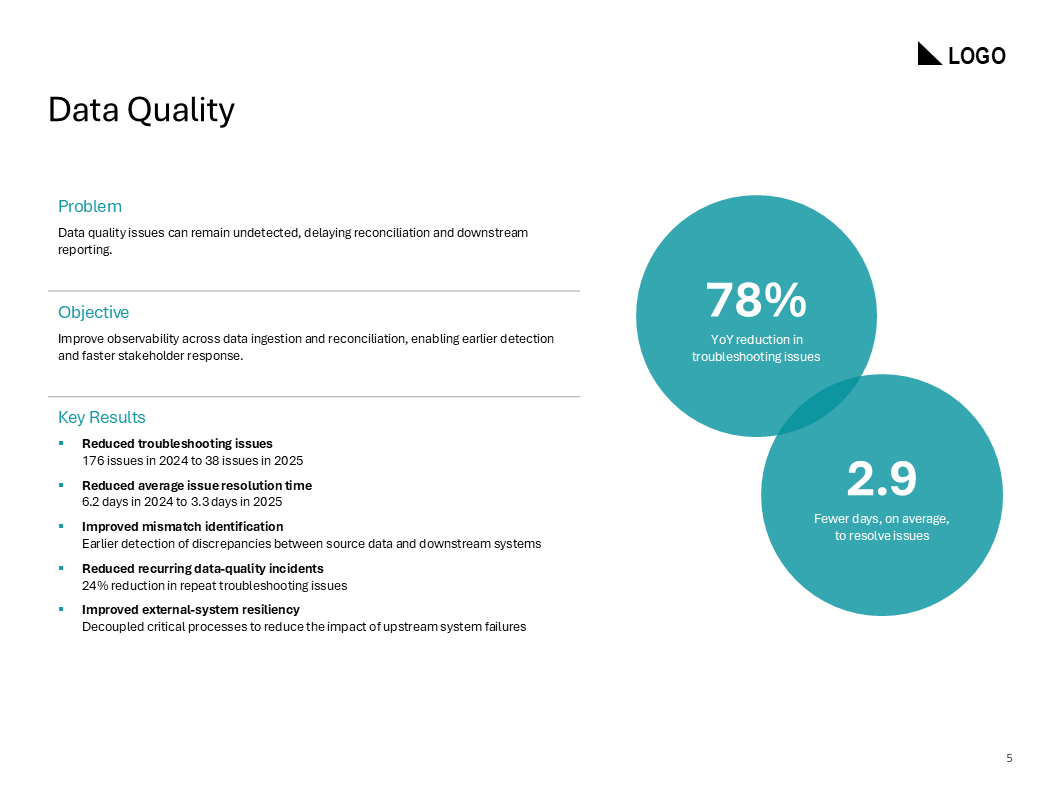
Quarterly Business Review (PowerPoint)

To view the flat and static deck iteration, click here.
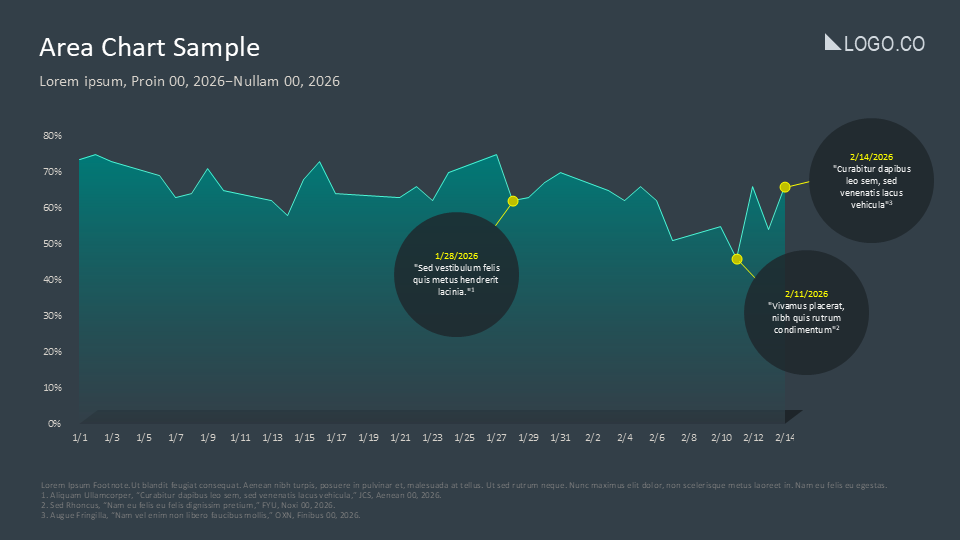
Client: General Asset Sample - Business Deck
Audience: Internal Operations Busines Update
Business Type: Corporate Quarterly Meeting

  • PowerPoint, stock photos and visual assets

    • All graphics, deck elements, transitions, animations, triggers, and infographics were custom designed and built within PowerPoint for this presentation.

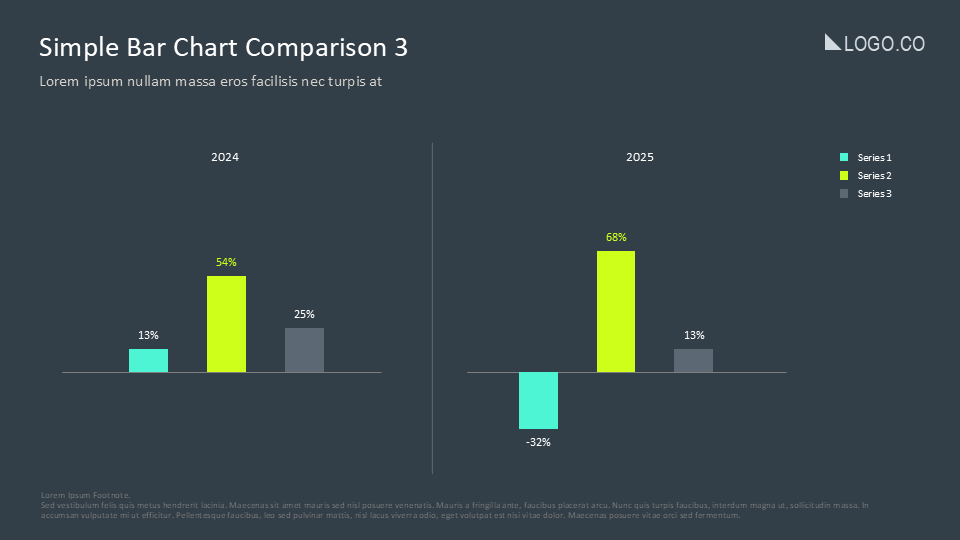
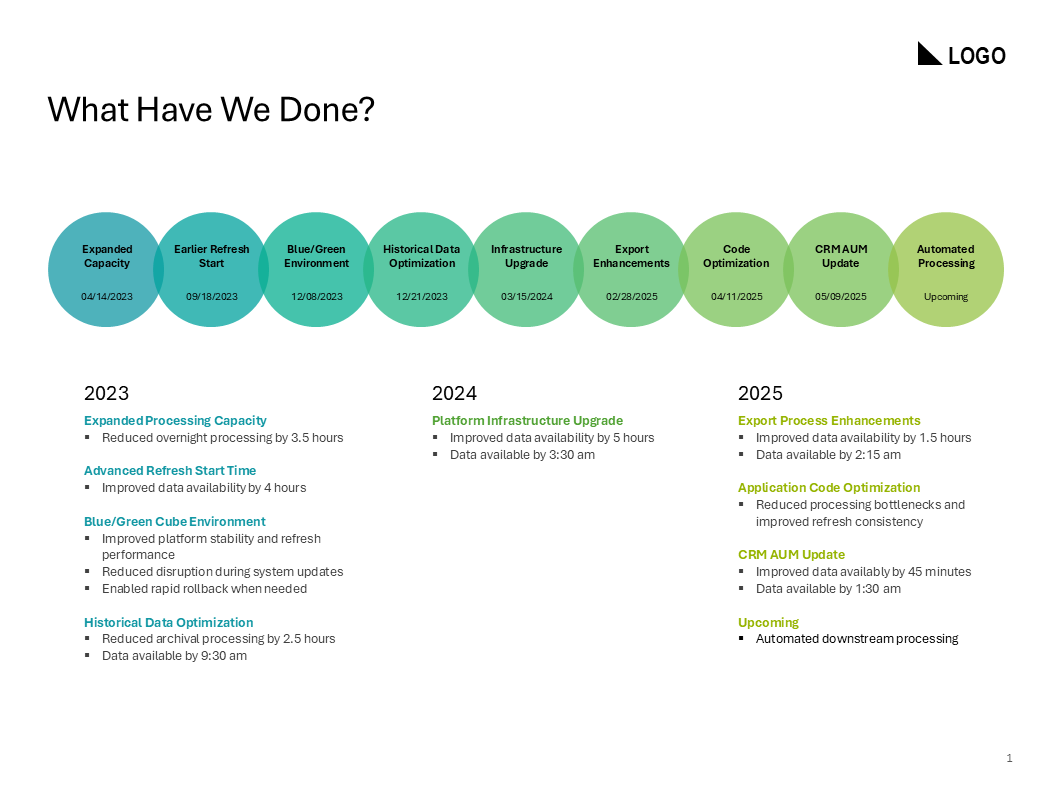
  • Business roll-up deck sample designed to inform leadership of quarterly performance, learnings, projections, and three decision points for the leadership group in attendance.

    This deck was created and presented in PowerPoint.

Interactive Transformation of a Data-Heavy Slide
(PowerPoint Sample)

Client: General Asset Sample - Chunking for Focus

Context

This sample showcases how to transform an information-dense infographic with fixed dimensions into an interactive click-to-reveal experience for Instructor-Led Training (ILT) audiences.

By utilizing the PowerPoint morph transition feature, the zoom-like lens presents information in a strategically organized and chunked manner, supporting learner engagement, focus, and information retention.

Client Technical User Guide
(Designed in PowerPoint)

Designed for: Admins (varying tech proficiency)
Purpose: LMS customization

Context
This brochure asset was developed in MS PowerPoint, as the client’s preferred platforms, Canva and Google Docs, lacked the required level of customization and asset handling. The client also specified that Adobe software (excluding Adobe Acrobat for PDF conversion) should not be used. Designed to be both digital and print-friendly, the brochure includes admin-level tutorials that clearly explain frequently used features and administrative tasks in the Learning Management System (LMS). Each section provides straightforward, step-by-step instructions, supporting users with varying levels of tech proficiency to navigate and efficiently utilize LMS functionalities.

    • PowerPoint: Created the source document for ease of client use

    • Adobe Acrobat Pro: PDF is fully hyperlinked and user accessible

    • Camtasia

    • Adobe Creative Suite

    • Other design software

  • The project encountered several key challenges:

    • Canva and Google Docs Design Limitations
      Canva and Google Docs, the client’s preferred platforms, were inadequate for the required level of customization and asset handling.

    • Client's Proficiency with Adobe Suite
      The client’s unfamiliarity with Adobe Creative Suite and Adobe Acrobat Pro necessitated a more accessible solution.

    To overcome these challenges, PowerPoint was utilized for the source document creation, offering a user-friendly and sustainable format for the client.

    Additionally, the lack of a structured outline or general steps required comprehensive research and fully custom development. Extensive screenshot cleanup and digital refinement were employed to produce precise and clear guides, minimizing confusion and enhancing overall clarity.